BACK
Project Room
Unifying fragmented enterprise collaboration workflows into a single project workspace.

Enterprise SaaS
Product Strategy
Collaboration Platform
Design system
Company
Works Applications
Role
Product Designer
Timeline
2021
Product
Project Room
Executive Summary
Building a unified collaboration experience
Works Applications had two established collaboration products — Projects and Timeline — that supported project management and organization-wide communication.
Over time, both products entered maintenance mode and struggled to keep up with growing customer expectations. Their separation also created fragmented workflows between structured project work and everyday team collaboration.
I worked on Project Room, a new enterprise collaboration experience that brought these capabilities together into a more unified, scalable workspace for large organizations.
Business challenge
Fragmented tools were limiting collaboration
The challenge was not simply modernizing two legacy products. We needed to rethink how project management and day-to-day collaboration could work together as one coherent experience.

Research & Discovery
Understanding how collaboration actually happened
I worked with product and business partners to understand existing workflows, identify limitations in the legacy products, and translate customer needs into product requirements.

FINdings
What we learned
01
Project work and everyday communication were too disconnected.
Users needed structured project information and ongoing collaboration to live closer together rather than across separate products.
02
Legacy workflows created unnecessary context switching.
Moving between different tools made it harder to maintain visibility into both project progress and surrounding conversations.
03
Different enterprise roles required different levels of access and control.
The product needed to support complex organizational structures without making everyday collaboration feel unnecessarily complicated.
04
Inconsistent UI patterns made the platform harder to scale.
The new product needed not only new workflows, but a stronger system of reusable components and interaction patterns.
Design strategy
Designing one experience instead of two products
Rather than simply combining features from Projects and Timeline, the design strategy focused on creating a coherent collaboration model that could scale across enterprise teams.

Solutions
Turning fragmented workflows into a unified workspace
The final experience combined product integration with platform-level design improvements, addressing both immediate workflow problems and longer-term scalability.
Solution 01 — Unified Project Workspace
Bringing project management and collaboration together
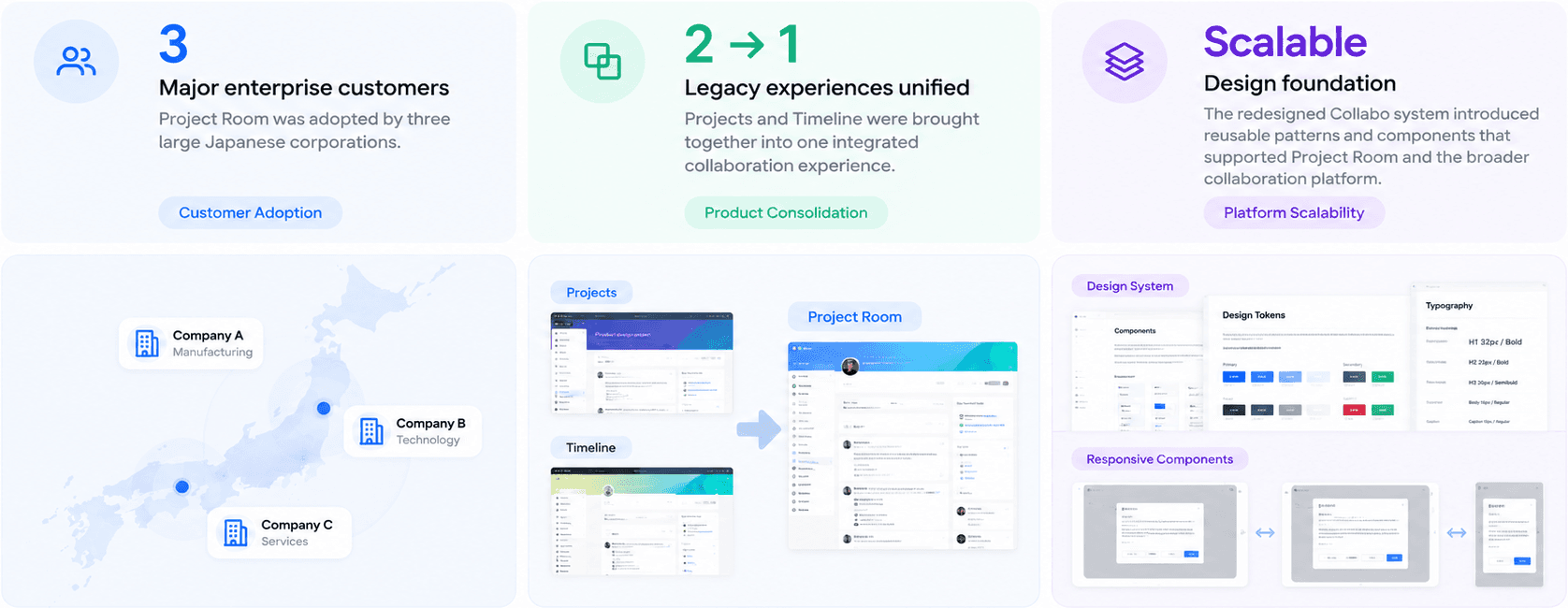
Project Room integrated the core strengths of Projects and Timeline into a single experience.
Instead of treating structured project work and team communication as separate activities, the new workspace created a shared context where users could follow project activity and collaborate around the work itself.
Why this mattered
Reducing the separation between the two products helped create a more continuous workflow and lowered the need for users to switch between different collaboration environments.

Final Project Room homepage / Project workspace


Solution 02 — Project-Centered Collaboration
Making communication part of the work, not a separate destination
The experience was designed around the project as the central context, helping users connect updates, discussions, and relevant information directly to ongoing work.
Clearer hierarchy and interaction patterns made it easier to understand what was happening within a project and where users needed to take action.
Why this mattered
Enterprise collaboration becomes difficult when conversations are detached from the work they relate to. Bringing communication closer to project context improved continuity and shared understanding.
Project view

Collaboration on the go


Solution 03 — Scalable Design Foundation
Creating reusable patterns across the collaboration platform
Alongside Project Room, I contributed to the evolution of the Collabo design system, standardizing visual foundations and reusable UI components.
The work covered areas such as typography, color, icons, components, and responsive interaction patterns.
For example, dialog behavior was standardized to remain centered and usable across different viewport sizes, with consistent spacing and internal scrolling for longer content.
Why this mattered
Project Room was not an isolated interface. A stronger design system reduced inconsistency and created a more scalable foundation for future enterprise collaboration experiences.

Impact
From two legacy products to an enterprise-ready collaboration platform
Project Room moved the collaboration experience beyond maintaining separate legacy tools and created a more integrated foundation for enterprise teamwork.
Reflection
Reflection
Project Room changed how I think about designing enterprise products.
The challenge was not simply adding more collaboration features. It was deciding how two established products, existing user habits, and complex organizational requirements could come together as one coherent experience.
I learned that successful platform design requires thinking beyond individual screens. Product architecture, workflow continuity, reusable interaction patterns, and system consistency all need to evolve together.
It also reinforced the importance of preserving what users already understand while creating a foundation flexible enough to support how their work will change over time.
More


